Showing posts with label Custom Product Designer for OpenCart. Show all posts

Tuesday, May 14, 2024

Exploring the Potential of Custom Product Design with Purpletree OpenCart Extension

Introduction

Custom product design has become a pivotal aspect of online retail, revolutionizing the way businesses interact with customers. The Purpletree OpenCart Custom Product Designer extension stands out as a game-changer in this realm, offering a seamless platform for creating personalized products.


Understanding the Extension

The Purpletree OpenCart Custom Product Designer extension empowers businesses to effortlessly integrate customizable product options into their OpenCart websites. This extension serves as a valuable asset for administrators and customers alike, facilitating the creation of a diverse range of products with minimal hassle.


Key Features

  1. Versatility: Customers can design various products, including but not limited to cups, T-shirts, visiting cards, birthday cards, diaries, and identity cards, using the extension's intuitive interface.


  2. Flexibility: The extension offers unparalleled flexibility, allowing users to tailor their creations according to their exact preferences.


  3. Child Products: The ability to create child products enhances customization options significantly. For instance, users can choose different styles or formats for products like business cards, starting with a basic design and then customizing further.


Getting Started

To embark on the custom product design journey with the Purpletree OpenCart extension, follow these steps:

  1. Installation: Install the Purpletree OpenCart Custom Product Designer extension on your Opencart website.

  2. Enable Child Product Options: Navigate to the extension settings in the Opencart dashboard and enable the "Use Child Products" option to unlock advanced customization features.


Conclusion

In conclusion, the Purpletree OpenCart Custom Product Designer extension elevates the online retail experience by offering unparalleled customization capabilities. By leveraging this extension, businesses can empower customers to design products tailored to their unique preferences, thereby enhancing engagement and satisfaction.

For more technical information or assistance, feel free to contact the Purpletree support desk.


This general article provides an overview of the Purpletree OpenCart Custom Product Designer extension, highlighting its features and benefits while offering guidance on getting started. For deeper technical insights, readers are encouraged to reach out to Purpletree's support desk.

Discover further Opencart extensions available for browsing here.

Note:- Please be advised that this article serves as a general overview. For accurate and detailed information about the product, it is recommended to visit the official product selling page. The information provided on the official page is considered authoritative and final.

Tuesday, May 30, 2023

Creating Designs with Purpletree Opencart Web to Print Extension: A Guide for Customers

 Purpletree Opencart Web to Print extension is designed to enable customers to create and customize designs for products on an Opencart e-commerce website. Here's a general overview of how customers can make designs using the Purpletree Opencart Web to Print extension:

  1. Accessing the Product Designer: When a customer visits a product page that has the Web to Print functionality enabled, they will typically see a "Design Now" or "Customize" button. Clicking on this button will take them to the product designer interface.


  2. Selecting the Product: In the product designer interface, customers will be prompted to select the product they want to customize. This can include items like t-shirts, mugs, business cards, or any other customizable product available on your website.

    Exploring the Features of Purpletree OpenCart Web to Print Extension

  3. Design Tools and Options: Once the product is selected, customers will have access to various design tools and options provided by the Purpletree Opencart Web to Print extension. These tools can include features like text editing, image uploading, shape drawing, color selection, and more.


  4. Adding Text and Images: Customers can add custom text by typing directly into the design area. They can choose fonts, adjust the text size, alignment, and color. Additionally, customers can upload their own images or choose from pre-loaded graphics to incorporate into their design.

  5. Customizing Design Elements: Customers can manipulate and customize design elements by resizing, rotating, or repositioning them. They can also apply various effects, such as gradients, shadows, or transparency, to enhance the visual appearance of their design.

  6. Previewing and Editing: The Purpletree Opencart Web to Print extension typically provides a preview feature that allows customers to see how their design will look on the selected product. Customers can review and edit their design until they are satisfied with the final result.

  7. Saving and Adding to Cart: Once the design is completed, customers can save their customized design and add the product to their cart for purchase. The extension will typically store the design details and link them to the customer's order for further processing.


It's important to note that the specific features and functionalities of the Purpletree Opencart Web to Print extension may vary based on the version and configuration settings of the extension. It's recommended to refer to the extension's documentation or contact the Purpletree support team for detailed instructions on using the Web to Print functionality.

Thursday, March 2, 2023

Key Benefits of Using OpenCart Point of Sale Plugin for Your Retail Business

 OpenCart Point of Sale (POS) is a web-based point of sale system that allows businesses to manage their retail operations. It offers a range of features that can help streamline operations, improve customer service, and boost sales.

In this article, we'll explore the benefits of using OpenCart Point of Sale.


  1. Easy to use interface One of the most significant advantages of using OpenCart Point of Sale is its user-friendly interface. The POS is designed to be intuitive and easy to navigate, even for users with little to no technical expertise. This makes it an ideal solution for businesses that want to minimize training time and maximize productivity.

  2. Real-time inventory tracking OpenCart Point of Sale offers real-time inventory tracking, which means that businesses can track inventory levels in real time. This ensures that businesses always know what they have in stock, and they can avoid stockouts and overselling. Real-time inventory tracking can also help businesses make data-driven decisions about their stock levels, which can help reduce waste and increase profitability.

  3. Customer management OpenCart Point of Sale also offers customer management features, which allow businesses to track customer data such as purchase history, preferences, and contact information. This can help businesses provide personalized customer service and marketing campaigns. Additionally, businesses can use this data to identify their most valuable customers and offer them rewards or incentives to encourage repeat business.

  4. Payment processing OpenCart Point of Sale integrates with a variety of payment processors, making it easy for businesses to accept payments from customers. This can include credit and debit cards, as well as digital payment methods like Apple Pay and Google Wallet. Payment processing is secure and reliable, which can help businesses build trust with their customers and improve the checkout experience.

  5. Reporting and analytics OpenCart Point of Sale provides robust reporting and analytics features, which allow businesses to track sales, inventory levels, customer data, and more. This data can be used to identify trends, make data-driven decisions, and optimize business operations. Reporting and analytics can also help businesses identify opportunities for growth and improvement.

  6. Customization OpenCart Point of Sale is highly customizable, allowing businesses to tailor the system to their specific needs. This can include customizing the user interface, adding new features, and integrating with other systems. Customization can help businesses improve productivity, reduce errors, and provide a better customer experience.

In conclusion, OpenCart Point of Sale offers a range of benefits that can help businesses streamline operations, improve customer service, and boost sales. From real-time inventory tracking to robust reporting and analytics, the system provides the tools businesses need to succeed in a competitive retail environment. Whether you're a small business owner or a large retail chain, OpenCart Point of Sale can help you achieve your business goals.

Check more OpenCart Extensions.

Monday, January 24, 2022

Online Product Designer eCommerce

 Purpletree Custom Product Designer is an opencart extension that permits your clients to create their ideal t-shirts, commercial enterprise cards, logo, labels, stickers, lettering, mugs and any product which wishes to be personalized online earlier than ordering.

Custom constructing a product is personalizing the product you desire to purchase, by way of choosing the details. There are distinctive approaches you can use to enable a product to be custom-built. The easiest instance would be an online customized product which lets in you to create a customized product

Another instance is an internet site that affords you an alternative to personalize the t-shirts, enterprise cards, logo, labels, stickers, lettering, and mugs on sale. If you haven’t seen one, try Purpletree opencart custom product designer. It lets the person edit the placement and dimension of graphics.


You can allow any product in opencart for customization with the use of the Purpletree Custom Product Designer Extension. This allows any person to diagram their very own images with a real photo stay product preview and can generate the print file for the order.

The patron himself uploaded images. Customers have a stay product preview in the course of the layout experience. The Purpletree’s Custom Product Designer Extension helps in many approaches of enterprise like promoting printed fancy clothes; birthday caps etc. The element which conflicts that the clients are now not capable to pick the fantastic Font or every now and then they do now not like the fonts which are statically furnished via Opencart product clothier extensions.


Opencart Product Designer.


We will go to the customized product diagram web page to format the product. We can diagram the product very easily. First of all, we will discuss the textual content layer and how to add a textual content layer and format it. We will click on the add textual content after that we will get the following page.

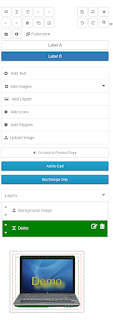
And we can see a responsive product diagram web page in cell view like this. You can see in responsive varieties like product fashion designer labels, layers, and canvas areas.

Opencart Extensions.


You can see all buttons in sequence like horizontal, vertical, flip, cross up, pass down, go left, go right, copy, email, delete, and ship pdf, help, and full screen. And different aspect saves, reset, view, undo, redo, zoom, etc. When a patron clicks on the add textual content tab, he will get a popup. The textual content houses popups will additionally be responsive, which is made fascinating in cell view.

Now we will click on the add textual content button after that we will add textual content residences one by one. These are made appealing textual content by using textual content decoration. We can add/change the text, font, and textual content color. That is text-decoration content. We can use one-of-a-kind kinds of homes to decorate textual content.


Friday, August 20, 2021

Advantages of using Opencart Extensions on websites

 Opencart extension is very easy to install on your opencart websites, opencart extension very easily Enhance the functions of websites, opencart extension comes in very less cost as compared to work, for example, best selling opencart multi vendor that changed opencart website into full functional best featured imprinted website is available in just 79 USD,

The now opencart website converted into multi-vendor eCommerce marketplace website have all advanced features so you can imagine how installing opencart extensions on a website is helping a lot,

Now take another example, you can create a web to print opencart website for 49 USD by just installing best selling web to print extension, already explained installing and configuration of opencart extensions on already working standard opencart website is very easy, there are always user guides for this purpose,

There are extensions for Email & SMS verification and Authenticationshippingbulk uploading of productsPDF upload, etc., these extensions are the best selling in the market and have a high reputation and developed by Top-rated developers

The benefit of using opencart extensions is that they enhance website features very easily, you need not do any coding, etc, just need to install opencart extensions, they will automatically enhance the features of opencart eCommerce website.

The big benefit of using opencart extensions is the type of quality received, if you hire a developer for custom work he will be doing it afresh but the extensions are developed and continuously monitored, and the best ever version is available for download,

Extensions also try to encompass the recommendation made by clients and try to put these features in it, so it also comes with the benefit of having maximum and top requisite features available.

Purple Tree Software is a best leading Mobile Application for Magento 2 in India and all over world. visit here:- https://www.purpletreesoftware.com/