Showing posts with label Customer Survey for Opencart Extension. Show all posts

Thursday, February 29, 2024

Unlocking Seamless Connectivity: How Purpletree Social Login Extensions Enhance Google Login Experience

 In today's digitally-driven world, online interactions have become a cornerstone of daily life. From social networking to e-commerce, the ability to seamlessly access platforms has become paramount. Recognizing this, Purpletree has developed innovative Social Login Extensions, designed to streamline the authentication process for users, particularly through Google Login. In this article, we'll delve into how Purpletree's extensions work to enhance the Google Login experience.

Understanding Social Login

Social login, also known as social sign-in or opencart social authentication, allows users to access various platforms using their existing social media credentials. It eliminates the need for users to create and remember separate login credentials for each website or application they engage with. This convenience not only enhances user experience but also accelerates the onboarding process for businesses.


The Role of Purpletree Social Login Extensions

Purpletree's Social Login Extensions leverage the power of popular social media platforms like Google to simplify the authentication process. Specifically, the extensions integrate seamlessly with Google Login APIs, enabling users to sign in to websites or applications using their Google accounts. Let's explore how these extensions work:

1. Integration with Google API:

Purpletree's extensions are built on robust frameworks that facilitate seamless integration with Google's authentication APIs. Through secure API calls, the extensions communicate with Google servers to verify user credentials and retrieve relevant user data.

2. User Authentication:

When a user chooses to log in using Google on a website or application equipped with Purpletree's extension, the authentication process begins. The extension prompts the user to select their preferred Google account for authentication.

3. Authorization and Permissions:

Once the user selects their Google account, the extension requests authorization to access specific user data, as defined by the website or application's requirements. This ensures that only relevant information is shared, safeguarding user privacy.

4. Data Retrieval and User Profile Creation:

Upon authorization, Purpletree's extension retrieves the necessary user data from Google, such as profile information and email address. This data is then used to create a user profile within the website or application, facilitating personalized user experiences.

5. Seamless Integration:

From the user's perspective, the entire authentication process is seamless and intuitive. With just a few clicks, users can access the desired platform without the hassle of entering and remembering separate login credentials.


Benefits of Purpletree Social Login Extensions for Google Login:

  1. Enhanced User Experience: By simplifying the login process, Purpletree's extensions enhance user experience, leading to higher user satisfaction and engagement.

  2. Faster Onboarding: Social login accelerates the onboarding process for new users, reducing barriers to entry and increasing conversion rates for businesses.

  3. Improved Security: Leveraging Google's robust authentication infrastructure enhances the security of the login process, reducing the risk of unauthorized access and data breaches.

  4. Personalization Opportunities: Access to user data obtained through Google Login enables businesses to deliver personalized experiences tailored to individual preferences and behaviors.

  5. Increased Trust and Credibility: Offering social login options, including Google Login, instills trust and credibility among users, as they rely on established platforms for authentication.

Conclusion:

In conclusion, Purpletree's Social Login Extensions revolutionize the Google Login experience, offering a seamless and secure authentication solution for websites and applications. By leveraging the power of Google's authentication APIs, these extensions enhance user experience, accelerate onboarding, and unlock new opportunities for personalization. As online interactions continue to evolve, Purpletree's innovative solutions pave the way for a more connected and engaging digital landscape.

Note:- Please be advised that this article serves as a general overview. For accurate and detailed information about the product, it is recommended to visit the official product selling page. The information provided on the official page is considered authoritative and final.

Tuesday, May 30, 2023

Creating Designs with Purpletree Opencart Web to Print Extension: A Guide for Customers

 Purpletree Opencart Web to Print extension is designed to enable customers to create and customize designs for products on an Opencart e-commerce website. Here's a general overview of how customers can make designs using the Purpletree Opencart Web to Print extension:

  1. Accessing the Product Designer: When a customer visits a product page that has the Web to Print functionality enabled, they will typically see a "Design Now" or "Customize" button. Clicking on this button will take them to the product designer interface.


  2. Selecting the Product: In the product designer interface, customers will be prompted to select the product they want to customize. This can include items like t-shirts, mugs, business cards, or any other customizable product available on your website.

    Exploring the Features of Purpletree OpenCart Web to Print Extension

  3. Design Tools and Options: Once the product is selected, customers will have access to various design tools and options provided by the Purpletree Opencart Web to Print extension. These tools can include features like text editing, image uploading, shape drawing, color selection, and more.


  4. Adding Text and Images: Customers can add custom text by typing directly into the design area. They can choose fonts, adjust the text size, alignment, and color. Additionally, customers can upload their own images or choose from pre-loaded graphics to incorporate into their design.

  5. Customizing Design Elements: Customers can manipulate and customize design elements by resizing, rotating, or repositioning them. They can also apply various effects, such as gradients, shadows, or transparency, to enhance the visual appearance of their design.

  6. Previewing and Editing: The Purpletree Opencart Web to Print extension typically provides a preview feature that allows customers to see how their design will look on the selected product. Customers can review and edit their design until they are satisfied with the final result.

  7. Saving and Adding to Cart: Once the design is completed, customers can save their customized design and add the product to their cart for purchase. The extension will typically store the design details and link them to the customer's order for further processing.


It's important to note that the specific features and functionalities of the Purpletree Opencart Web to Print extension may vary based on the version and configuration settings of the extension. It's recommended to refer to the extension's documentation or contact the Purpletree support team for detailed instructions on using the Web to Print functionality.

Monday, October 26, 2020

Benefits of Using Customer Survey for Opencart Extension

 Customer Survey for Opencart Extension is helpful in organizing surveys on the website for customers, This extension is helpful in reaching out to the customer to seek their opinion in statistical information, with this admin can have data what customer want? It is very easy to install and operate. We are discussing some of the exciting benefits of this extension below:

Increase Customer Engagement

With the use of this extension, customer engagement on the website increases, he spends more time on the website going through surveys and participating in them. Customers find it exciting in participating in surveys as he thinks someone is eagerly noting his views.

Collect Business Strategic Data

The key to a successful business is making the exact thing customer needs thereby reducing seller- customer gaps, this extension can be a game changer in this regard, Many companies before launching a product organizing survey sessions that are highly costly, but this online survey is very economical than organizing a specific survey sessions, etc.

Increases Transparent Ethics

It enhances the transparency images of your ecommerce website; the customer thinks that the owner of the site has provided them an open medium to hear their views that too in a statistical way where everything will display on mathematical figures so exact and correct.

Easy to Make Decisions

With the exact mathematical data, it becomes easier to make decisions for the owner, customers, and other stakeholders to make a correct decision, when decisions will be optimum result achieved are desirable.

Increase Recall Value for Site

If the client gets participated in the survey, he does it remembers then recall value for the website also enhances that will be helpful in increasing the loyalty base of customers and increase the sales.

Helpful in Making Site Eye-Catching

Please note with this extension website is enabled with attractive eye-catching fields; Customer gets attracted to seeing statistical graphs and pie-chart. It is being proved that the website gets special attention of visitors with this extension.

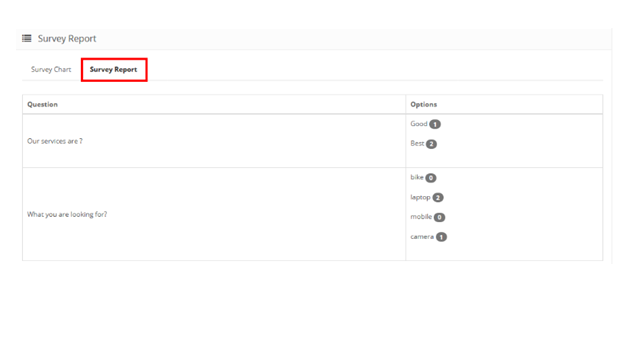
Images of survey & survey report on Frontend with the best selling Purpletree Customer Survey for Opencart Extension