Showing posts with label helpdesk for magento 2. Show all posts

Thursday, January 12, 2023

Magento 2 Multi Vendor Plugin Features

 Purpletree Multivendor Marketplace for Magento 2 makes it possible for sellers to sign up for a store on the website and sell their products there. It gives Magento 2 stores a complete multi-vendor system. As a seller, the vendor gains access to the Seller Panel, which enables them to perform a variety of tasks normally reserved for administrators.


This extension already has features like an admin commission on seller orders, a seller dashboard, payment to the seller, and many more. There is no need to install another extension for these features.

Features for sellers in the Purpletree Multivendor Marketplace for Magento 2 Vendor Registration: Sellers can easily register on the website by filling out the customer registration form alone. On the customer registration form, there is an option to become a seller; select that option and enter your unique store URL. The seller could also be a previous customer.

Manage Store Information

 After becoming a seller, sellers can easily enter all of their store information on the Store Info Tab from the Seller Panel using the registration page or the customer login. If the administrator requires seller approval, the administrator must authorize the seller to use additional features; if the administrator does not require seller approval, the seller can immediately begin selling their product.


Even if a seller hasn't been approved, they can always access their Store Info so that the admin can see their details and either approve or disapprove them.


Add/Edit Products

 The seller can add and edit products from the seller panel. However, the seller must first receive admin approval before this feature will work. From their account, the seller can create simple, configurable, downloadable, and virtual products. They can even make Seller Attribute Sets and Seller Attributes that can be used to make products that can be changed. In default Magento 2, the seller can enter all of the product information as an administrator.

 Opencart Multi Vendor Plugin.

Order Management

If a customer places an order for any seller product, the seller has the ability to manage that order by either changing the status of the seller order or creating a seller invoice for the order that only includes their products. This could only be accomplished if the administrator consents to the seller managing orders.


Customer Enquiries

 From the Seller Listing or the Seller Store Page, any customer can easily contact any seller. From the Seller Panel, the seller can easily view all customer inquiries and respond to each one.


Management of Commissions

When a seller order is completed, the admin will receive a commission that the admin has set for the order. The list of Commissions that the admin has deducted from the Seller Payments for the seller's order can be viewed by the seller.

Payments from the seller occur when the order is finished by the seller or admin. The admin would receive an order commission from the seller, and the admin would be responsible for paying the remainder through the admin panel. The payment seller could view the payments that the admin made to that seller from the Seller Panel when they settled. From this Payments listing page, the seller could see the total sales, commissions, paid amount, and due amount.


Magento 2 Multi Vendor Plugin.


Thursday, November 3, 2022

Magento 2 Helpdesk by Purpletree

 Purpletree Software has some top-of-the-line Magento 2 expansions for the Online Magento business site. Each magento2 augmentation has its own recognized and concentrated highlight. These expansions are exceptionally valuable and even required for your site. All magento2 augmentations are very easy to use. In this blog, I have clarified for you the five most well-known Magento2 Helpdesk/Support desks for Online Magento 2 business sites.


Magento Helpdesk/Backing Work area Module permits the administrator and client to convey between them any inquiry in regards to the request or whatever else. It permits clients or visitors to raise any solicitation to the administrator for a request or some other reason.


Magento Helpdesk Extension.


Clients can essentially sign in to their record and raise the solicitation from their record dashboard. What's more, the Administrator will receive the message and can answer appropriately. Both will likewise receive an email warning for something very similar whenever empowered from Helpdesk Design settings.


Here all the correspondence between them is put away and both the administrator and client can follow the solicitation and answer by an administrator from their record.


Purpletree Magento 2 helpdesk is an expansion when it is introduced on Magento 2 Web-based business Site. It lays out a Helpdesk for Magento 2 Internet business store. The helpdesk or Backing Work area is a framework through which clients can raise the help ticket on Helpsek, and the Administrator can settle those issues and update them in the ticket.


Assuming you are having a Magento 2 Web based business site, you should have a ticket Helpdesk incorporated with your Magento 2 Internet business Site, So your significant client can raise their issues utilizing the ticket. A well-useful helpdesk causes your Online business site to draw in additional clients as clients get to trust your Magento 2 Site.


Magento 2 Multi Vendor Marketplace Extension by Purpletree Software.


Monday, November 1, 2021

Top Line Organization for Opencart Module

Purpletree Software is among the top module merchants for Opencart just as Magento Tools for eCommerce. The modules presented by purpletree are the most famous expansions inside the Opencart just as the Magento class. A large number that is sold by means of Purpletree programming is the most well-known Extensions inside their separate classes. In this article, we will talk about why we should purchase the Opencart and Magento apparatuses from Purpletree Software. 


A greater part of the elements are accessible available 


Opencart expansions, or Magento Extensions, have the most elements that are equivalent to the different Extensions and modules available. This is on the grounds that they can pay attention to ideas from clients and consolidate these provisions in their expansions, and they update their Extensions with new capacities and elements and give you generally excellent results. 


Quick and solid help 


Their help group has amazing regard in the market As well as being presented for nothing for a very long time. During the following half-year, you can get top-notch support totally at no expense. Purpletree Software has a well-working assistance work area. You can monitor inquiries regarding uphold and get support whenever on your PC, tablet or cell phone, etc. So you can rapidly arrive at the Purpletree Support staff. 


A huge number are top dealers 


It's undeniably true that there are numerous Purpletree Software expansions that are the top-rated in their individual classes and incorporate climate highlights like Purpletree Opencart Multivendor, web to print module, Opencart portable application, Opencart SMS two-factor verification module


Like Magento Multivendor, Magento versatile application I'm taking note of a couple of Extensions in this article; notwithstanding, numerous different expansions are top merchants. 


They are accessible at this connection. 


Check More Extensions here.


Get updated Extensions free of charge 


Purpletree is continually refreshing its expansions and furthermore adds new capacities in the most inventive manner in front of the opposition So, in case there's a requirement for new Extensions that have been delivered. Purpletree is extremely liberal in providing refreshed expansions at no expense. You should simply download the latest expansion and afterward move up to the most current form, then, at that point, you'll have the option to get to every one of the latest elements. 


Supports all themes that are standard 


Purpletree Extensions is compatible with all themes. There is no page break in the augmentation combined with the standard topic. Notwithstanding, in certain topics, the plan might be founded on the default subject, while in different topics it depends on a current topic that is utilized for frontend augmentation, and the backend seems to be apparent in case it's as of now. In the event that the expansion is performed in the backend and there isn't anything to show on the frontend, then, at that point, the appearance of the subject is invalid and nobody can inquire. 


Coherent authorizing/licensing framework 


Its permitting strategy is fantastic enough that you can get to two test spaces for nothing of cost. Likewise, on one life area, the permit space approval can be changed whenever within a half year of procurement, so the arrangement on licenses is exceptionally legitimate and steady.


Sunday, November 8, 2020

Benefits of Using Support Desk/ Helpdesk for Magento 2


Every good store has support system/ Helpdesk for magento 2 assisting its clients, If your Magento store has a dedicate ticket raising system integrated than you can achieve superb results, it is beneficial for both owner and customers, although we are discussing its benefits below in details the biggest advantage you have is your store is considered of top notch reputation if there is ticket system, you yourself assume you are browsing a store there you provided proper support-ticket system for your grievances, you will come again and again to store rather than having no support desk.

Some advantages we are trying to discuss in below points:-

We are discussing for Support desk/ helpdesk for Magento 2

Set Standard & Organised Client Support System

With the help of this extension admin can set up a very standard way of handling client requests at such a nominal cost, You can easily understand doing follow up using mail and using a dedicated ticket system, how it enhances acceptability of your Magento store and increase its brand value is not very hard to understand.

Easy to Track the History and follow ups

Both admin and customer can easily track their past history and follow ups on signing up the ticket, there is not any specific information to remember, just sign in dashboard and check your past follow ups,

Client Mail can also Amalgamated in Ticket System

Clients mail to a particular email Id can be easily forwarded to the Ticket system, this reduces time in checking mails and enables to do follow up in tickets, also in due process tickets are created for the client easily.

Reduces Time in Segregation & Filter

It is very easy to search the replies, follow ups of clients on admin side, admin can easily check it based on dates, weeks months, customer mail id, user name, ticket number etc, every past information can be accessed very easily.

Easy & Fast Responsive Dashboard

Dashboard both at admin and customer side is very easy to fast and easy to access, No any advanced expertise required to run it, it is very simple, user friendly designed with easy accessible buttons provided.

Attach all Type of Files in Tickets

All types of files can be easily attached in the ticket itself, pdf, doc, docx, xls, xlsx, csv, txt, jpg, jpeg, png, gif, admin can select status, department, priority and set them properly finally.

Customers can easily attach files in the ticket.

Enhances Security and Helpful in Maintaining Confidential

When a customer shares confidential things etc he gets fear of losing data and associated risks, but with this extension these types of risks are removed, the client also gets confidence to share confidential information on the ticket system.

Easy and Instant Notification on Emails

The admin and customer both get instant mail notification whenever there is a new message in, it is very helpful in replying promptly and avoiding delays, Mail can be set up very easily to receive the notification.

Easy to Add and Edit Departments

Departments can be easily added manually and using export sheets if they are large in numbers, they can be enabled to active status from admin.There are easy options for editing, delete and filter based search options for the department

Some Visuals of Support Desk/ Helpdesk

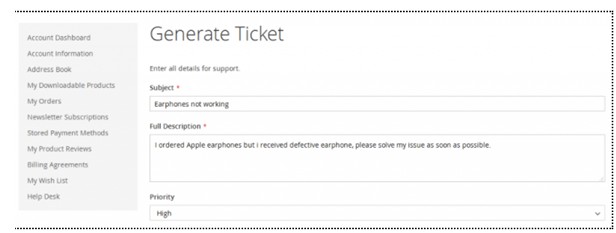
View while user creating ticket from its interface

Ticket/support desk front views


All necessary fields like subject, ticket number, priority department, status, create date is provided on front itself.