Showing posts with label opencart extensions. Show all posts

Tuesday, January 31, 2023

Maximizing Your Earnings with Magento 2 Multi-Vendor Plugin: An Insider's Guide

 A Magento 2 Marketplace plugin allows you to create a multi-vendor e-commerce platform using the Magento 2 framework. It enables multiple vendors to sell their products on a single platform, providing a centralized platform for product listings, order management, and payment processing.

The plugin typically includes features such as vendor management, product management, commission management, and order management.


Magento Multi Seller Plugin is a software module designed to add multi-vendor functionality to a Magento 2 e-commerce website. It enables multiple vendors to sell their products on a single platform, providing a centralized platform for product listings, order management, and payment processing. 

The module typically includes features such as vendor management, product management, commission management, and order management. It can be purchased from a Magento 2 extension marketplace and installed on a Magento 2 website to transform it into a multi-vendor marketplace.


There are several ways to earn using a Magento 2 multi-vendor website:

  1. Commission: Charge vendors a commission on each sale made through the platform.

  2. Subscription: Offer a subscription-based model where vendors pay a monthly or annual fee to sell on the platform.

  3. Advertising: Sell advertising space on the platform to vendors or other businesses.

  4. Premium features: Offer premium features such as better product placement, more advertising space, or priority customer support for a fee.

  5. Product sales: Sell products directly on the platform, in addition to offering a marketplace for vendors.

  6. Value-added services: Offer value-added services such as fulfillment, shipping, or customer support for a fee.

  7. Upsells: Offer upsells to vendors such as premium product listings, featured product listings, or increased advertising space.

Here are the general steps to set up a Magento 2 Marketplace plugin:

  1. Install the plugin: Purchase and download the plugin, then install it on your Magento 2 website using the Magento 2 Marketplace or via FTP.

  2. Configure the plugin: Go to the Magento 2 backend, navigate to the plugin settings, and configure the plugin to your desired specifications. This includes setting up vendor registration, commission rates, payment methods, and more.

  3. Create vendor accounts: Invite vendors to create accounts on the platform. They can then start listing and selling their products.

  4. Manage orders: Monitor and manage orders from the Magento 2 backend. This includes tracking order status, shipping information, and payment processing.

  5. Manage commission: Set up commission structures and manage vendor payouts from the Magento 2 backend.

  6. Promote the platform: Promote the platform to potential vendors and customers through various marketing channels such as email, social media, and paid advertising.

  7. Monitor performance: Regularly monitor the performance of the platform and make adjustments as needed to optimize vendor and customer experience.

Global Best Seller OpenCart Multi Vendor Plugin.

Monday, August 1, 2022

Opencart Multi Vendor Commission Payouts

 Opencart Multi Vendor Marketplace facilitates that whenever it is installed on Opencart eCommerce website. It converts the existing OpenCart eCommerce website into a Multi-Vendor Marketplace. In that vendors can register themselves and sell products.

Vendors can subscribe to the subscription plans and have to pay commission on sales of Products to vendors as configured by the admin. That may be fixed or percentage.

The commission may be set on Global commissions, Category commissions, or store commissions.

 Types of Commission available


Opencart Multi Vendor Marketplace Global commission is set for the whole website marketplace. It is applicable to all products, and stores of all vendors.

The global commission is set fixed commission or percentage commission.


The store commission is set based on a particular store whenever the store commission is set up for a store it applies to only that store, not another store.


Then category commission, category commission is set based on the category of products being sold by the vendors.


The commission needs to be set for each category unique.

This means if the category is set up[ for the parent category, it will be applied only to the main category, not the sub-category.

Then there are priorities of commission calculations.

Priority of Commission calculations

First category commission is considered then store commission and after it global commission.

If a commission is considered for calculation then other lower level of commission is not considered for calculations.

The admin can also disable the commissions by simpling putting the values for commission calculations as zero.

Note that when commission is calculated after completing the order by vendor and admin order status.

The commission is calculated the admin can generate commission invoices.


Commission invoices and payout

 After commissions invoices are generated the admin can pay payouts to vendors using Paypal or the Offline method and make physical entries into the system.

There is also a simultaneous pay method, in which payments are sent to admin and vendor simultaneously. It is sent by Paypal payouts and stripe payments method.

In this PayPal payout and stripe payments method when the order is completed, the commission amount is sent to the admin, and money left after deducting the commission is sent to the admin. This split payment method is available for stripe and Paypal payout.


Customer Payment Gateways

           The Customer can use any payment gateways for making orders, Those payments 


           supported by Opencart. For sending payments from admin to vendors it will be Paypal or 


             stripe method also split payment methods are available. So you have the advantage of 


           using any Opencart-supported payment gateways for use with the customers.


          For more details on the Opencart Mobile App check here.


Thursday, December 2, 2021

Opencart Handle lost Sales

 Now, you can recover the lost sales by automatically reminding the potential customers related to the abandoned carts. With the Abandoned Cart Reminder for Opencart, it is easy to send automatic or manual email reminders to the users, this allows them to finish up the shopping. Now, you can bring back the users to the store, boost up the conversions, and boost the revenues by reducing cart abandonment. It is better to add on auto-generated coupons and convoy them in reminder emails to make sure for a better rate of success. Contact Purple Tree Software for more information.


At whatever point any guest or potential client peruses your site to buy an item, he becomes intrigued by an item and afterward dependent on his prerequisite and wishes he chose that item and adds them to cart, so the item is added to cart now,

Yet because of any potential explanation he alters his perspective and doesn’t finish the checkout cycle, so the item stays in the cart, however, the request isn’t sent to checkout so this request that isn’t in checkout yet in the cart is considered as abandoned cart item.

This item needs tad deals to exercise and the administrator should attempt to change over this into real deals, really this is only a model item there might be n number of items like this ways, so on the off chance that they keep on being in the cart for what it’s worth and not changed over then the deals of the site will be influenced obviously so administrator needs to do smidgen promoting activity to change over this into deals.

Check more Opencart Extensions here.


The Opencart expansion, Purpletree Opencart Abandoned cart Module helps a ton this, with the assistance of this Module administrator, can without much of a stretch deal with the forsake carts items, the administrator can send warnings to clients to finish their leave cart items, the administrator can offer limits and other special exercises.

This expansion accompanies a half year of free help and supports all opencart set-ups, setup without influencing any document. The supported Opencart versions are 3. x, 2.3.x, 2.2.x, 2.1.x

.There is a legitimate all-around disclosed aid for how to set up cron, email format, and so forth for sending messages and others like it. The very much portrayed information base article is likewise there to help you.

Monday, October 4, 2021

New Functionality in Opencart Multi Vendor Bulk Product upload


Overview


The Opencart Multi-Vendor, Bulk export, import, and update of products is built-in, it is possible to use this function within this extension. Opencart Multiseller extension without the need to install any additional extension at all, in the ongoing development of this extension we need to examine the functionality of existing products, so that when importing new products, only the latest product is added, not all. and during the bulk update, existing products will be updated only the ones that are in stock are updated, not every single one, since there will be new products added only to import products, not in the existing stock. Also, in the updates and modifications, only existing products will be updated instead of adding new products. This can help the admin control the adding new products when updating existing products that are added.


Opencart Export Import Module

Extension purpletree Opencart bulk export import extension can be useful for implementing all the import functions, updates, and exports for your Opencart online store. It can be extremely helpful when transferring data from one website version to another , such as Opencart versions 2 and 3. Opencart version 3. It is also useful in day-to-day import and export applications for products It comes with all the standard forms, you only need to enter the information in an excel spreadsheet and then import the product and then click the export button. The extension will export your products to an excel spreadsheet, and you could save it during the time of migration, or you can update or modify data, and then upload to make the product updated There are different options for each Export, Import, and Update of the products. This allows you to perform all import and export functions in one place and with speed.


You can make use of the template sheet to create your import sheet. The layout will be similar, only you need to add information into it for your products. You can effectively use this Excel sheet to accomplish your required tasks.


Miscellaneous

The Bulk export-import feature is separately available in the Opencart Bulk Export Import extension as well as when you use the Opencart Multi vendor within the Opencart Multi vendor, you'll have it as an existing built-in functionality. For a separate purchase to your Opencart admin catalog, you can purchase the best-selling Purpletree Opencart Bulk Export Import module. The extension comes with six months of support for free and two test domains and is compatible with localhost with no consumption license.


Thursday, September 9, 2021

Opencart One page checkout extension

 If we discuss the checkout process in Opencart eCommerce website, if there is default opencart checkout in usage there is no harm, it is also good but if you as the owner of good performing Opencart eCommerce website, wants that there should be one page, fast and reliable checkout by your valuable customer at your eCommerce website, then you have to use a good performing Opencart one-page checkout extension.


Actually, with the help of Opencart one page checkout extension, there is an option for customers to fast checkout by customers, it takes very little effort by customers, so customers feel quite comfortable in the checkout at your eCommerce website.


The benefit of using opencart one page checkout extension:-


It saves lots of time for customers in the checkout process, also takes fewer details from customers while checkout, so, it helps in attracting more customers, thus increasing the customer base for eCommerce websites, thus in reverse, it will increase the sales of your eCommerce platform. Thus it helps in recall value for eCommerce websites in memories of customers,


It helps in increasing the positive mindset for eCommerce websites, more search to conversion rates, improve the site parameters and operations, one-page checkout and one-page money transfer.


If your competitors' websites have these extensions installed you can imagine loss occurring to you for not using this. Thus you as an admin should point out to use this,


As per my suggestion, you can use Purpletree Opencart one page checkout extension, it comes with six months of free support, and a full descriptive user guide, It is from Purpletree Software, which is the developer of much best selling and extremely popular opencart extensions.


You can best sell Opencart one page checkout extension from here.


Synopsis of Extension:-


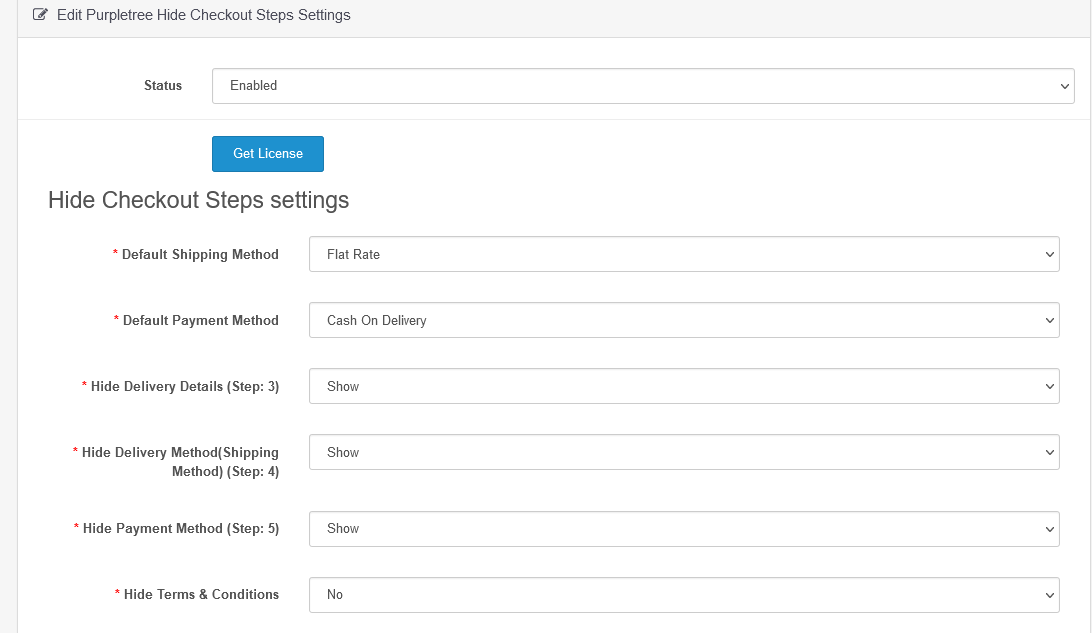
Opencart one-page checkout extension helps in setting the default payment method, default shipping method, you can hide the checkout options that will not be available during checkout, if those selected will be hidden at checkout then obviously the checkout process will be fast.

You can very easily hide for both guest checkout and registered customers as an option is there.


There will be an option there individually to hide the requisite and your wished parameters of checkout separately for registered customers or guest checkout or both.


You will be offered to hide anything like the shipping process, payment process, Delivery Process, terms and conditions.


It comes with six months of free premium support.