Showing posts with label opencart modules. Show all posts

Monday, August 1, 2022

Opencart Multi Vendor Commission Payouts

 Opencart Multi Vendor Marketplace facilitates that whenever it is installed on Opencart eCommerce website. It converts the existing OpenCart eCommerce website into a Multi-Vendor Marketplace. In that vendors can register themselves and sell products.

Vendors can subscribe to the subscription plans and have to pay commission on sales of Products to vendors as configured by the admin. That may be fixed or percentage.

The commission may be set on Global commissions, Category commissions, or store commissions.

 Types of Commission available


Opencart Multi Vendor Marketplace Global commission is set for the whole website marketplace. It is applicable to all products, and stores of all vendors.

The global commission is set fixed commission or percentage commission.


The store commission is set based on a particular store whenever the store commission is set up for a store it applies to only that store, not another store.


Then category commission, category commission is set based on the category of products being sold by the vendors.


The commission needs to be set for each category unique.

This means if the category is set up[ for the parent category, it will be applied only to the main category, not the sub-category.

Then there are priorities of commission calculations.

Priority of Commission calculations

First category commission is considered then store commission and after it global commission.

If a commission is considered for calculation then other lower level of commission is not considered for calculations.

The admin can also disable the commissions by simpling putting the values for commission calculations as zero.

Note that when commission is calculated after completing the order by vendor and admin order status.

The commission is calculated the admin can generate commission invoices.


Commission invoices and payout

 After commissions invoices are generated the admin can pay payouts to vendors using Paypal or the Offline method and make physical entries into the system.

There is also a simultaneous pay method, in which payments are sent to admin and vendor simultaneously. It is sent by Paypal payouts and stripe payments method.

In this PayPal payout and stripe payments method when the order is completed, the commission amount is sent to the admin, and money left after deducting the commission is sent to the admin. This split payment method is available for stripe and Paypal payout.


Customer Payment Gateways

           The Customer can use any payment gateways for making orders, Those payments 


           supported by Opencart. For sending payments from admin to vendors it will be Paypal or 


             stripe method also split payment methods are available. So you have the advantage of 


           using any Opencart-supported payment gateways for use with the customers.


          For more details on the Opencart Mobile App check here.


Tuesday, March 1, 2022

Opencart SMS OTP and Verification

 2 Factor Authentication, OTP, and SMS Notifications Extension exceptionally helpful for Opencart Store. 2 Factor Authentication, OTP and SMS Notifications Extension give SMS related features like 

BULK SMS to the client, 

Order SMS, 

Order Status Update connected with SMS, 

and confirmation related SMS. 

SMS Verification is the fundamental highlight of 2 Factor Authentication, 

OTP, and SMS Notifications Extension.


Confirmation SMS is utilized for security purposes at the hour of client registration and item checkout. 2 Types of check in Opencart SMS warning. The first is Mobile no check and the second is email confirmation.


To get the Purpletree Opencart SMS OTP Extension, click here.


Most importantly introduced Opencart SMS expansion with the assistance of a client guide. After that go to the Purpletree SMS menu and select settings. You will reach the 2 Factor Authentication Opencart setting page. Here you can change SMS settings. Assuming that you are installing 2 Factor Authentication Opencart whenever you first need to test the SMS API. For the Test SMS API go to the Test SMS tab and enter versatile no., SMS text, and snap on the Test button.


After clicking on the Test button, your SMS API reaction shows beneath the Test button. To check, SMS goes to the SMS confirmation tab. Here you can change the setting regarding SMS check.

Check on Registration


For set check on the client enrollment page. Set "Yes "on "Check on enrollment". After ``Set yes on "Check on enrollment" one choice is shown beneath this choice layout. In the format choice, you can change check or OPT SMS text. After that select the "Check for "choice. In Verification for Option, you can choose versatile no or Email and Mobile no, Email both.

(More Details of Opencart Multi Vendor Marketplace)


         Check on checkout


For set confirmation on the Checkout page. Set "Yes "on "Confirmation on checkout". After that, set the Yes of Verification to the checkout choice. Two choices show beneath this choice" Payment strategy for checkout confirmation" and ``Template. Installment strategy for checkout choice shows the empowered all installment technique and for select all installment technique. So SMS check applies when clients use the choose technique for Payment. In the format choice, the administrator can change the SMS layout. From there on select the "Check for "choice. In Verification for Option, you can choose versatile no or Email and Mobile no, Email both.


Check more opencart Extensions here


Tuesday, November 23, 2021

Big Opencart Extensions Offers

 Purpletree Software, one of the most renowned Opencart & Magento modules developer company, is hosting this Black Friday and Cyber Monday sale.

It's offering exclusive discount coupons on purchases of themes, modules, apps and other services.

Opencart Extensions 

The Opencart Extension is extremely simple to install on opencart sites, the opencart extension is very easy to enhance the functionality of websites, opencart extension is available at a cheaper cost when compared with the work. For instance, the most popular opencart multi-vendor that transformed opencart's website to a fully functional, top-printed website comes for just 69 dollars.


The opencart site that is now converted to a multi-vendor eCommerce marketplace has all the latest features, and you can see how adding opencart extensions to the website can benefit tremendously,

Let's look at another example: you can build a web printing opencart website for just 49 dollars by installing the best-selling extension web to print as previously explained. Installing and setting up opencart extensions to a standard opencart site is simple, and there are users guides to help you with this,

There are extensions to Verification of SMS and Email and authentication, shipping, bulk uploading of products, PDF upload, and so on. These extensions are among the most popular on the market, and have an excellent reputation and were designed by top-rated developers.

The advantage of using the opencart extension is that it can enhance the features of websites very quickly You don't have to learn any programming you just have to install the opencart extensions. They will automatically improve the features of your opencart eCommerce website.

The main advantage of using Opencart extensions is the high quality you will receive, in the event that you employ a developer to complete specific work, they are going to do it all over again however the extensions are created and continually evaluated, and the latest version is now available for download.


Extensions try to include the suggestions of clients and also try to include these features into it as well, which comes with the advantage of having the most advanced and required features readily available.


Free support & installation

Opencart Complete Multivendor Marketplace includes six months of support. It also comes with a free installation service. It is compatible with all themes. It works with any opencart standard theme.

Let's say that a seller sells a variety of products for admin. These items might be sold in large quantities due to cross-product or associated product sales.

Do you want to create an impact? market If you're looking to expand your business globally it is the right option to choose. This is the ideal option for you. This extension can provide everything you need to expand.

There are many more Extensions for Opencart They are the very best.


Wednesday, October 20, 2021

Opencart Multi Seller eCommerce

 Multivendor Opencart eCommerce Portal

Opencart Multivendor When installed on any ecommerce website, opencart website can be transformed into an opencart marketplace site. Vendors can sell and add products to this website. You can also add products and sell them. Seller vacation, RMA, Smart Product, multi-store, template products, simultaneous payments, seller detail module, commission, subscription invoice, template product, etc.

Opencart Multivendor administrators make money in three different ways. The admin sells his product on the marketplace. Traffic will rise if there are many sellers. If admin sells his product, he will get more customers. This will lead to a positive increase in revenue.

Let's suppose that a seller sells many product admin products. These products could be sold in large numbers due to cross-product and related product sales.

Now, we will discuss two revenue-generating options that admins have: vendor subscription or commission.

Functionalities Opencart Multi Vendor

To join a marketplace, a vendor must pay a subscription fee. The administrator then determines the number of featured products and featured shops. After the subscription plan is activated by the vendor

It will only be valid for the products described in the plan. It will have a validity day, allowable featured products, and other benefits. Subscription plans can be purchased.


An operational seller dashboard is also available. Sellers have access to manage their seller functionality, including products and orders. Commission, commission invoices. Subscription plan subscription invoices. Shipping and payments Blog, comments Upload bulk products. Information about the store. Management of inquiries. Check out management. Get management.

Many new features will be available, including seller vacation mode, Hyperlocal setup, Quick edit smart forms, bulk product upload, bulk shipping upload, attributes, option uploaded, and bulk shipment upload.

Free support & installation

Opencart Complete Multivendor Marketplace includes six months of support. You also get a free installation service. It works with all themes. It will work with any standard opencart theme.

Let's suppose that a seller sells many product admin products. These products could be sold in large numbers due to cross-product and related product sales.

Do you want to make an impact? marketplace If you want to grow your business internationally, this is the way to go. This is the right choice for you. This extension will provide everything your business requires to grow.

You can find more Opencart Extensions that are the best.

Searching for Opencart SMS Extension, check here.

Monday, October 18, 2021

Opencart Abandoned Cart Reminder


Overview of Opencart abandoned carts


Whenever any visitor or a potential customer browses your website to purchase a product, he becomes interested in a product, and then based on his requirement and wishes he selected those products and add them to the cart, so the product is added to the cart now, but due to any potential reason he changes his mind, and do not complete the checkout process, so the product remains in the cart, but the order is not forwarded to checkout so this order that is not in the checkout but in the cart is considered as abandon cart product.


 This product needs a little bit of sales exercise and the admin should try to convert this into actual sales, actually, this is just an example product there may be n number of products like this ways, so if they continue to be in cart as it is and not converted then the sales of the site will be affected of course so admin needs to do little bit marketing exercise to convert this into sales.


Compatibility and terms


The Opencart extension, Purpletree Opencart abandoned cart extension helps a lot for this, with the help of this extension admin can easily manage the abandoned carts products, admin can send notifications to customers to complete their abandoned carts products, admin can offer discounts and other promotional activities. This extension comes with six months of free support and supports all opencart core standards set up without affecting any file. The supported Opencart versions are  3. x, 2.3.x, 2.2.x, 2.1.x


.There is a proper well explained guide for how to set up cron, email template, etc for sending emails and others like it. The very well-described knowledge base article is also there to assist you.


Utility of extension in sales conversion

Now it is very clear that this extension helps a lot in attaining more sales and more abandon cart to sales ratio, it is because, when the customer gets notified from time to time about their abandoned carts, the customer's chances of a return for the completion of the checkout process that was left in between increases by many folds. This extension can also be helpful in increasing cross-sales and sales of related products. The customer if want can offer discounts coupons etc for abandon the cart by sending separate promotional emails etc. it's very easy to set the email alert cron for customers that have left products in the cart.

The big advantage of this extension is also that the admin can operate it so easily and smoothly that it acts like a pro.

You can see more best-selling Opencart Extensions here.


Thursday, September 9, 2021

Opencart One page checkout extension

 If we discuss the checkout process in Opencart eCommerce website, if there is default opencart checkout in usage there is no harm, it is also good but if you as the owner of good performing Opencart eCommerce website, wants that there should be one page, fast and reliable checkout by your valuable customer at your eCommerce website, then you have to use a good performing Opencart one-page checkout extension.


Actually, with the help of Opencart one page checkout extension, there is an option for customers to fast checkout by customers, it takes very little effort by customers, so customers feel quite comfortable in the checkout at your eCommerce website.


The benefit of using opencart one page checkout extension:-


It saves lots of time for customers in the checkout process, also takes fewer details from customers while checkout, so, it helps in attracting more customers, thus increasing the customer base for eCommerce websites, thus in reverse, it will increase the sales of your eCommerce platform. Thus it helps in recall value for eCommerce websites in memories of customers,


It helps in increasing the positive mindset for eCommerce websites, more search to conversion rates, improve the site parameters and operations, one-page checkout and one-page money transfer.


If your competitors' websites have these extensions installed you can imagine loss occurring to you for not using this. Thus you as an admin should point out to use this,


As per my suggestion, you can use Purpletree Opencart one page checkout extension, it comes with six months of free support, and a full descriptive user guide, It is from Purpletree Software, which is the developer of much best selling and extremely popular opencart extensions.


You can best sell Opencart one page checkout extension from here.


Synopsis of Extension:-


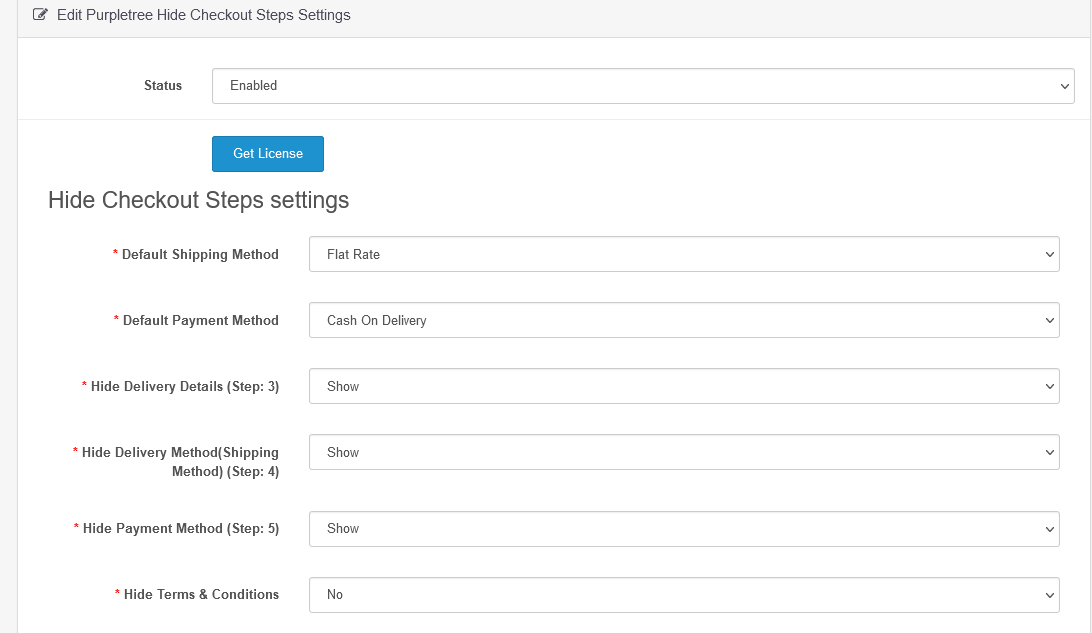
Opencart one-page checkout extension helps in setting the default payment method, default shipping method, you can hide the checkout options that will not be available during checkout, if those selected will be hidden at checkout then obviously the checkout process will be fast.

You can very easily hide for both guest checkout and registered customers as an option is there.


There will be an option there individually to hide the requisite and your wished parameters of checkout separately for registered customers or guest checkout or both.


You will be offered to hide anything like the shipping process, payment process, Delivery Process, terms and conditions.


It comes with six months of free premium support.


Monday, May 11, 2020

Trends in Opencart Marketplace & Related Modules World Wide


If you want to create marketplace in word wide like other e-commerce website and you want to make business worldwide. This is best option for you. In this extension you will get everything that can take your business to new heights. Some features of this extension are given below.


1. Subscription plan: The subscription plan is the most powerful feature of the marketplace. In this, the admin determines the joining fee, subscription fee and price of the subscription plan.  Admin can allow adding number of products, number of featured product, number of category featured product and featured store also. In this, the administrator creates the plan first and allows the seller to add products to the plan. Admin can assign subscription plan to seller and enable and disable plan also. Admin can assign subscription plan form two ways. Seller need to subscribe plan or plans to add products in subscription plan, Seller can only add products in subscription plan according to the plan subscribed by them. Seller can choose subscription plan as wish. Seller cans payment of subscription plan in two type online and offline.

Admin can add subscription plan which seen by image.


Admin can add joining fee, subscription fee and other condition.


Admin can assign to seller a subscription plan which is showing by image.


The seller will see the plan added by the admin something like this which is showing by image.


2. Bulk Product import and export: Bulk import and export product is very important part of multivendor which allow to admin and seller to bulk import product. Admin can do bulk import and export product. Due to these specialties, the multiverse gets a strong feeling. In this marketplace can bulk update product also. In this extension allow to export all data at a time. We can add one or more product at a time. Previously we added products one by one. This process was very time consuming. Now you can upload large amount of data at a time in single excel file. If admin want to update large amount of data update at a time now you can do that also. This is a big feature in the world of e-commerce and opencart multivendor marketplace extension. Admin can assign bulk product to the seller and update bulk product at a time also. Admin and seller do not need to have any type of technical support team and knowledge of programming. Admin and seller should have knowledge of application operate only. The admin faces a lot of difficult problems in the e-commerce business. The admin faces a lot of hard problems to update product data. It solves many problems by this extension. Bulk import and export support with multiple language.

Admin side will see something like this.


Seller side will see something like this.


3. Geo zone shipping: This is Geo zone shipping method which gives price update facility for select zone. It is apply to product order according to shipping address. This Functionality can be more beneficial for the sellers if they do not need to give the same price for different zones. Previously Admin do set shipping rate according to weight, country and zone bases. Geo zone shipping applies on order checkout time.  Customer pays shipping charge with order on checkout time. This is set by admin and seller. Admin and seller can select order wise and product wise shipping. This is divided in three parts like flat rate shipping, advanced shipping and flexible shipping.

Admin can add/Edit shipping rates something like this. Admin can add Geo zone for self and seller also. If the administrator adds shipping rates for himself, he should fill N/A in the Seller store name otherwise select store name.


Seller can add/Edit shipping rates something like this. Seller can add Geo zone for himself also. 


Our multivendor has many similar features which makes our multivendor more beautiful. In multivendor, we can also do seller or admin chat. And the seller can also chat to customer. This multi vendor has a very good feature of communication. Multi vendor have features of shipping also like zip code shipping and Geo zone shipping.